
How to Install IPTV Smarters Pro Android for IPTV UK Streaming
How to Install IPTV Smarters Pro on Android – Step-by-Step Guide for IPTV UK Users
If you want to enjoy smooth and high-quality streaming on your Android device, IPTV Smarters Pro is one of the best choices available. Whether you’re using a smartphone, tablet, or Android TV box, this app gives you a user-friendly interface, easy navigation, and stable performance for all your IPTV UK content.
Step 1: Download the IPTV Smarters Pro App
You can find the app on the Google Play Store by searching for “IPTV Smarters Pro Android.” Once located, tap Install to start downloading. If your Android device doesn’t have access to the Play Store, you can also download the APK file from the official IPTV Smarters website.
Step 2: Open the App and Accept Permissions
When you first launch IPTV Smarters Pro, you’ll be prompted to accept certain permissions, such as storage access, to ensure smooth streaming. Grant these permissions so the app can store temporary data and improve playback quality.
Step 3: Log In with Your IPTV Account
After opening the app, choose the “Load Your Playlist or File/URL” option. Enter your IPTV uk subscription credentials, including the M3U playlist URL or Xtream Codes API details provided by your IPTV service. For IPTV UK subscribers, make sure to enter the exact URL given in your order confirmation to avoid login errors.
Step 4: Choose Your Preferred Player and Settings
IPTV Smarters Pro allows you to select an internal or external media player. On Android IPTV app setup, most users prefer the default built-in player, as it’s optimized for smooth playback. You can also adjust settings like EPG (Electronic Program Guide), time zone, and language for a personalized experience.
Step 5: Start Watching Your Favourite Channels
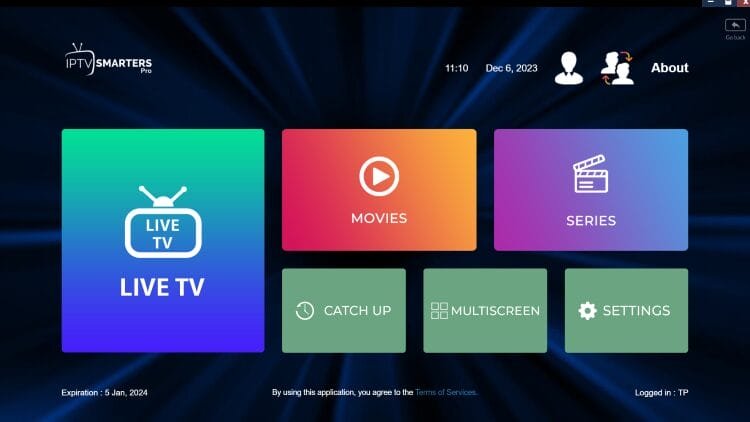
Once everything is set up, simply browse through categories such as Live TV, Movies, and Series. You can also use the search feature to quickly find your favourite IPTV UK channels and on-demand content.
Why Choose IPTV Smarters Pro ?
Cross-device compatibility – Works on smartphones, tablets, and Android TV boxes.
Clean interface – Easy navigation for both beginners and experienced IPTV users.
Multi-screen support – Watch two streams at the same time.
VOD integration – Access movies and series directly within the app.
If you’re looking for a smooth and reliable Android IPTV player installation, IPTV Smarters Pro is an excellent choice to make the most out of your subscription.
Start Streaming IPTV UK on Android Today!
Don’t wait any longer to enjoy thousands of live TV channels, movies, and shows right on your Android device. With IPTV Smarters Pro Android, you can access your IPTV UK subscription instantly, enjoy smooth playback, and organize your favourite channels with ease.
Get your subscription now from DOTTV.UK and start streaming in minutes! Click below to claim your trial or full plan and elevate your TV experience today.
Advanced Setup Tips
Once you have IPTV Smarters Pro installed, there are several ways to enhance your IPTV streaming experience.
1. Organize Channels and Playlists
Most users receive hundreds or even thousands of channels in their IPTV subscription. Using IPTV Smarters Pro Android, you can create custom playlists, group channels by category, and mark your favourites. This makes it easier to navigate through your IPTV content quickly.
2. Use the EPG (Electronic Program Guide)
The EPG feature in Smarters Pro allows you to see upcoming TV shows, sports events, and other programming. Enabling this in your IPTV Smarters Pro Android setup ensures you never miss live events on your IPTV UK service.
3. Adjust Streaming Quality
Depending on your internet speed, you can choose between HD, SD, or adaptive streaming in the app. For stable IPTV UK streaming on Android, adaptive settings often work best, as they automatically adjust video quality to prevent buffering.
4. Multi-Screen Viewing
With IPTV Smarters Pro Android, you can watch two streams at once on supported devices. This is particularly useful if you have a sports subscription or want to follow multiple live channels simultaneously from your IPTV UK package.
5. Keep the App Updated
Regular updates ensure compatibility with the latest Android versions and improve the security and performance of your IPTV UK streams. Always download updates from trusted sources or the official app to avoid risks.